Commercial and industrial facilities require more than basic cameras. A properly planned video surveillance system should provide reliable coverage, useful recorded evidence, secure remote access, and a foundation that can expand as the facility changes.
This guide explains the major considerations involved in planning commercial and industrial video surveillance systems, including camera placement, network infrastructure, recording architecture, analytics, environmental conditions, and integration.
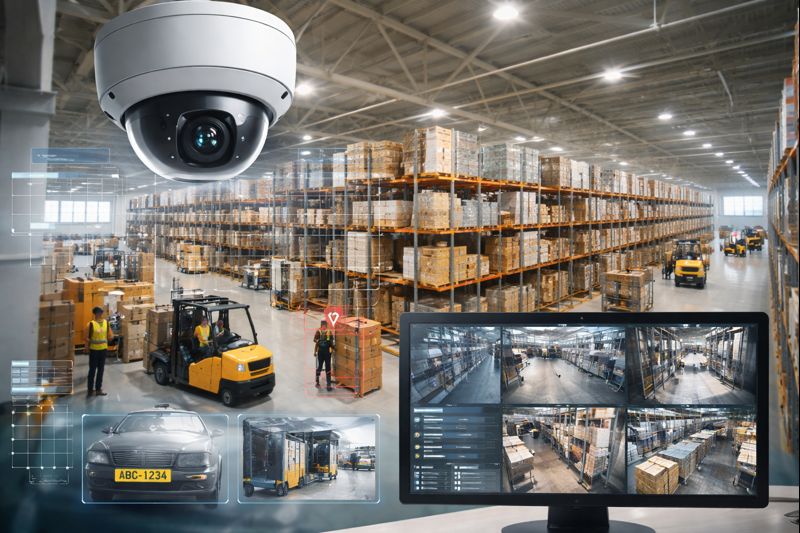
What Makes Commercial Video Surveillance Different?
Residential camera systems are generally designed around small buildings, limited camera counts, and relatively simple recording requirements.
Commercial and industrial surveillance projects may involve:
- Warehouses and distribution centers
- Manufacturing facilities
- Industrial buildings
- Office and commercial properties
- Logistics operations
- Multi-building campuses
- Retail and mixed-use properties
- Educational and institutional facilities
- Multifamily properties
- Large exterior yards and parking areas
These environments often require substantially more planning because cameras, network switches, fiber, PoE capacity, recording storage, cybersecurity, and facility operations must work together.
The objective should not simply be to install cameras.
The objective should be to build a surveillance system that provides usable coverage and reliable evidence when an event actually occurs.
Start With the Security Objective
One of the most common surveillance design mistakes is choosing cameras before identifying what each camera is expected to accomplish.
Every important camera location should have a defined purpose.
Typical surveillance objectives include:
- Detecting people entering restricted areas
- Identifying individuals at entrances
- Recording vehicle activity
- Monitoring loading docks
- Documenting shipping and receiving
- Investigating workplace incidents
- Monitoring production areas
- Protecting inventory
- Reducing theft and shrinkage
- Monitoring parking areas
- Protecting exterior equipment
- Reviewing forklift or vehicle incidents
- Monitoring gates and perimeter areas
A camera intended to observe general activity may require a completely different lens, mounting height, resolution, and field of view than a camera intended to identify a face or read a license plate.
Camera Placement Matters More Than Camera Count
Installing additional cameras does not automatically create better surveillance.
A properly designed system evaluates:
- Field of view
- Pixel density
- Camera height
- Lighting
- Backlighting
- Distance from the target
- Lens selection
- Obstructions
- Environmental conditions
- Expected activity
- Required identification detail
For example, a wide-angle warehouse camera may provide excellent situational awareness but insufficient detail to identify a person across the building.
Likewise, a camera positioned too high above an entrance may record the top of someone’s head rather than a useful facial image.
Commercial surveillance design should balance overview coverage with identification coverage.
Video Surveillance for Warehouses and Distribution Centers
Warehouses present several unique surveillance challenges.
High ceilings, long aisles, loading docks, changing inventory levels, forklifts, trailers, and exterior yards all affect camera placement.
Important surveillance areas may include:
- Employee entrances
- Shipping and receiving doors
- Loading docks
- Trailer yards
- High-value storage areas
- Inventory aisles
- Forklift routes
- Packing areas
- Exterior doors
- Parking areas
- Perimeter fencing
- Gates
Multi-sensor and panoramic cameras can be particularly useful in large open areas where several conventional cameras would otherwise be required.
However, panoramic coverage should still be supplemented by dedicated identification cameras when detailed evidence is necessary.
Manufacturing Video Surveillance
Manufacturing facilities may use surveillance for both security and operational investigation.
Common applications include:
- Production-floor monitoring
- Employee and contractor entrances
- Tool and equipment areas
- Material storage
- Shipping and receiving
- Safety incident investigation
- Vehicle and forklift activity
- Restricted production areas
- Exterior equipment
- Gates and perimeter areas
Camera selection must also account for environmental conditions such as:
- Dust
- Moisture
- Extreme temperatures
- Vibration
- Poor lighting
- High ceilings
- Outdoor exposure
- Hazardous or specialized operating environments
Standard indoor cameras may not be appropriate for every industrial location.
IP Video Surveillance Infrastructure
Modern commercial surveillance systems are typically built using IP-based cameras connected through an Ethernet network.
The network infrastructure supporting those cameras is just as important as the cameras themselves.
Projects may require:
- Cat6 cabling
- Fiber-optic backbone connections
- PoE network switches
- Intermediate network closets
- Equipment racks
- UPS backup
- Surge protection
- Network segmentation
- Secure remote connectivity
Large facilities frequently require fiber between buildings or network closets because Ethernet cable has practical distance limitations.
Planning the network correctly during the initial installation makes future expansion significantly easier.
Power Over Ethernet
Power over Ethernet, or PoE, allows both electrical power and network communication to travel over the same Ethernet cable.
This simplifies many camera installations, but the available PoE power budget must still be calculated.
Higher-powered devices may include:
- PTZ cameras
- Multi-sensor cameras
- Illuminators
- Heated outdoor cameras
- Specialized analytics cameras
An improperly sized network switch may support the required number of ports while still lacking enough power to operate every connected camera reliably.
Video Management Systems
The Video Management System, or VMS, is the software platform used to manage cameras, recorded video, users, alerts, and system functions.
Commercial organizations may use:
- On-premises VMS
- Cloud-managed systems
- Cloud-recorded systems
- Hybrid architectures
The correct architecture depends on several factors, including:
- Camera count
- Required retention
- Available bandwidth
- Cybersecurity policies
- Multi-site management requirements
- Remote-access needs
- Redundancy requirements
- IT policies
There is no single architecture that is best for every organization.
Recording and Video Storage
Storage requirements should be calculated rather than guessed.
Recording capacity can be affected by:
- Number of cameras
- Camera resolution
- Frames per second
- Compression
- Scene activity
- Continuous versus event recording
- Retention requirements
An organization requiring 30 days of recording across dozens of cameras may require substantially more storage than a smaller system using motion-based recording.
Storage should also include adequate capacity for anticipated expansion whenever practical.
AI Video Analytics
Modern surveillance platforms can use analytics to identify specific types of activity instead of relying exclusively on basic motion detection.
Depending on the platform, analytics may help classify:
- People
- Vehicles
- Objects
- Direction of travel
- Restricted-area activity
- Loitering
- Line crossing
- Unusual events
Analytics can reduce the amount of irrelevant video operators must review.
They may also support proactive notification when defined events occur.
Analytics should be properly configured for the environment. Poorly configured rules can generate excessive alarms and quickly become ineffective.
License Plate Recognition
License plate recognition cameras require specialized design.
Successful plate capture depends on:
- Vehicle speed
- Camera angle
- Distance
- Mounting height
- Lighting
- Lens selection
- Exposure configuration
- Lane width
A general-purpose parking-lot camera should not automatically be expected to provide reliable license plate identification.
Where plate evidence matters, dedicated LPR cameras should usually be designed specifically around the vehicle capture point.
Low-Light Surveillance
Lighting conditions can dramatically affect video quality.
Areas requiring additional consideration may include:
- Parking lots
- Warehouses after operating hours
- Loading docks
- Exterior yards
- Perimeters
- Remote storage areas
Modern cameras may offer technologies such as:
- Infrared illumination
- Wide dynamic range
- Low-light sensors
- Full-color nighttime imaging
Camera selection should be based on the actual lighting environment rather than specification-sheet resolution alone.
Cybersecurity Considerations
Video surveillance cameras and recorders are network-connected devices and should be treated as part of the organization’s technology infrastructure.
Basic security practices may include:
- Changing default credentials
- Strong password policies
- User permission management
- Firmware updates
- Network segmentation
- Controlled remote access
- Removing unused accounts
- Maintaining supported software
Remote access should be configured using secure methods approved by the organization whenever possible.
Integration With Access Control
Video surveillance becomes more useful when important access-control events can be associated with recorded video.
For example, an operator investigating a door event may be able to review:
- Which credential was presented
- Which door was accessed
- When the event occurred
- Corresponding camera footage
This can accelerate investigations and provide stronger context than either system operating independently.
Integration With Intrusion Detection
Video can also support alarm verification.
A conventional alarm may identify that a sensor activated.
Associated video may help determine what actually occurred.
Potential applications include:
- Perimeter alarms
- Interior intrusion detection
- After-hours activity
- Gate activity
- Restricted-area alarms
Proper integration can help security personnel make better-informed decisions.
Remote Video Monitoring
Some facilities use remote video monitoring to provide additional after-hours protection.
Depending on the system and monitoring strategy, analytics may identify activity and send selected events for review.
Applications may include:
- Construction yards
- Equipment yards
- Warehouses
- Industrial properties
- Vehicle lots
- Perimeters
- Remote facilities
Remote monitoring should be designed around clearly defined detection areas and response procedures rather than simply forwarding every motion event.
Planning for Future Expansion
Commercial surveillance systems frequently grow after the original installation.
Future expansion might include:
- Additional cameras
- New buildings
- Additional parking areas
- New loading docks
- Additional network closets
- Increased recording retention
- Analytics
- License plate recognition
- Access-control integration
Planning additional switch capacity, fiber strands, rack space, storage, and licensing during the original design can reduce future upgrade costs.
Existing Camera System Upgrades
A complete replacement is not always necessary.
Organizations with existing IP cameras may be able to modernize portions of their surveillance infrastructure while retaining usable equipment.
An upgrade assessment may evaluate:
- Existing cameras
- Cabling
- Network switches
- Recording servers
- Storage
- VMS compatibility
- Camera firmware
- Image quality
- Cybersecurity
- Expansion requirements
Older cameras may sometimes be retained while the recording platform, network infrastructure, or management software is modernized.
Commercial Video Surveillance Installation Planning
Before requesting proposals, organizations should document several basic requirements.
These include:
- Which areas require surveillance?
- What must each camera identify?
- How long must recordings be retained?
- Who requires remote access?
- Are multiple facilities involved?
- Will the system integrate with access control or intrusion detection?
- Are analytics required?
- Will license plate capture be needed?
- Is fiber required between buildings or network closets?
- How much future expansion should the design support?
Clear answers to these questions help create a more accurate system design.
Working With a Commercial Video Surveillance Integrator
Large surveillance projects usually involve more than camera installation.
A commercial security integrator may coordinate:
- Site assessment
- Camera layout
- Network architecture
- Structured cabling
- Fiber infrastructure
- PoE switching
- Recording systems
- VMS configuration
- Analytics
- User permissions
- System testing
- Training
- Long-term service
The goal should be to create a surveillance platform that remains manageable as the organization grows.
Frequently Asked Questions
What is the difference between commercial and residential video surveillance?
Commercial systems generally support larger camera counts, greater storage requirements, multiple buildings, enterprise user management, advanced networking, system integration, analytics, and long-term scalability.
How many cameras does a warehouse need?
There is no standard number. Camera quantity depends on the building layout, surveillance objectives, ceiling height, entrances, loading docks, aisles, exterior areas, identification requirements, and desired image detail.
How long should commercial surveillance footage be retained?
Retention requirements vary by organization. Common factors include internal policy, operational needs, insurance requirements, investigation timelines, camera count, resolution, and available storage.
Can existing IP cameras be reused?
Often they can. Compatibility depends on the camera models, firmware, video-management platform, network configuration, resolution, and condition of the existing equipment.
Should a commercial surveillance system use cloud or on-premises recording?
Either can be appropriate. On-premises, cloud, and hybrid systems each have advantages. The correct architecture depends on bandwidth, camera count, cybersecurity requirements, retention, remote-access requirements, and multi-site management needs.
Can video surveillance integrate with access control?
Yes. Properly integrated systems can associate access-control activity with corresponding camera footage, helping organizations investigate door events more efficiently.
Can video analytics replace physical security?
No. Analytics are tools that help identify defined events and reduce the amount of video requiring manual review. They should be part of a broader security strategy rather than treated as a complete security solution.
When should fiber be used for surveillance systems?
Fiber is commonly used between buildings, across large facilities, or between network closets where Ethernet distance limitations, electrical isolation, bandwidth, or future expansion make fiber the better infrastructure choice.
Continue the technical planning
Use the complete planning guide, camera and hardware hub, manufacturer comparison and acceptance worksheets to turn these site observations into testable requirements. Review privacy, audio, user permissions and incident preservation separately from camera coverage.
Related NERSA reference
See NERSA’s Hazleton video surveillance reference for the corresponding applied reference.